Book meetings with motivated sellers.
Deal Knock finds owners who are ready to sell, warms them up with a visit, a like and a real comment, then starts the conversation in their own business hours. Nothing sends until you approve it.
- Approval on every message
- Sends in each lead's local hours
- No passwords stored
Sample data
- Search filters
- 20+
- With include and exclude on each one
- Channels, one inbox
- 2
- LinkedIn and email replies together
- Invites a week, at most
- 100
- A ceiling that protects your profile
- Approved by you
- 100%
- Every message, unless you turn it off
Find owners who are ready to sell.
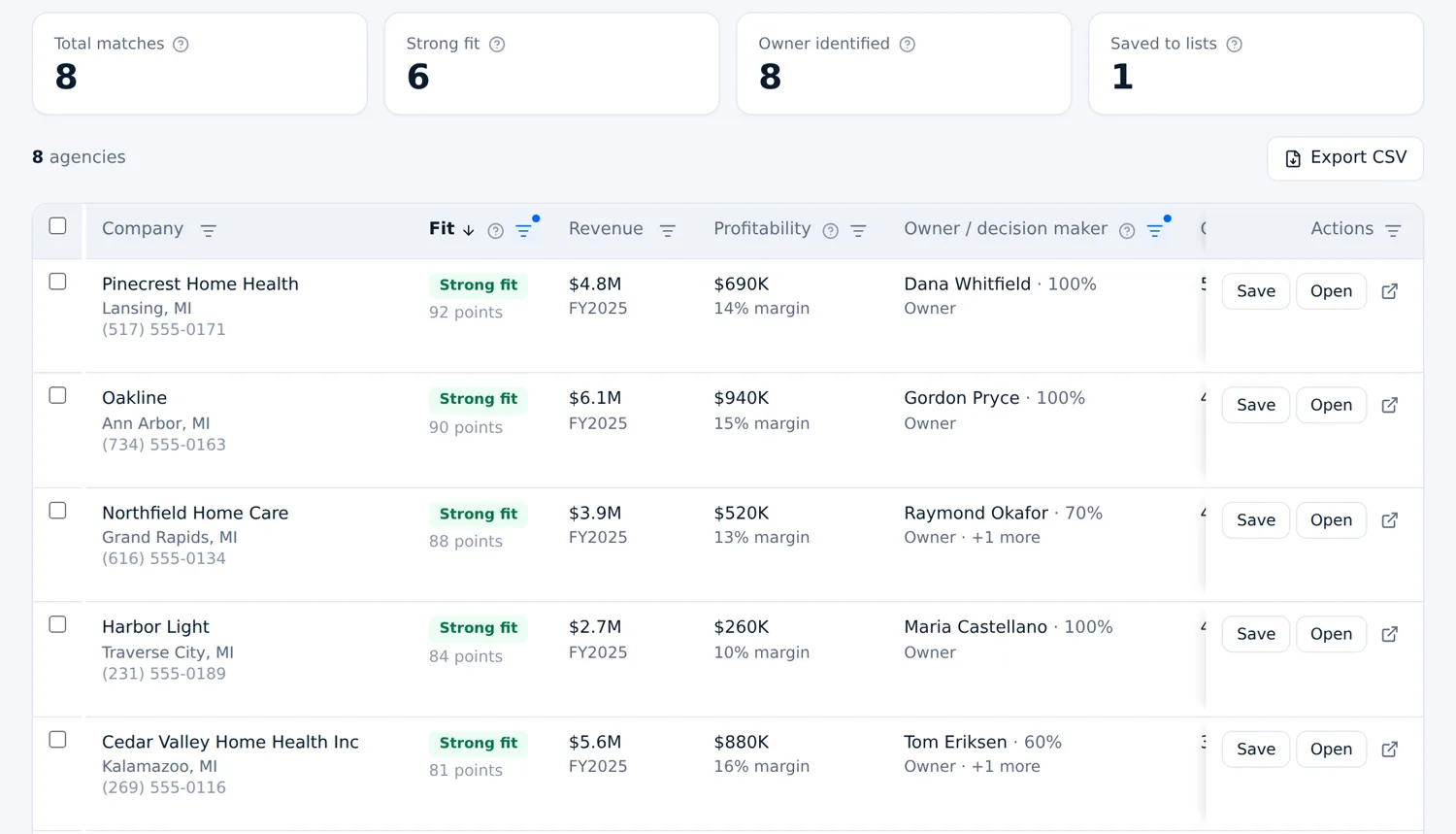
Start from official Medicare and registry records as well as LinkedIn. Every business is scored against your buy box, shows the owner behind it and moves straight into your pipeline.
Search the records
Pick a state and an industry, from home health and hospice to plumbing and roofing. Filter by ownership, years in business and revenue, then save the search and see what is new.
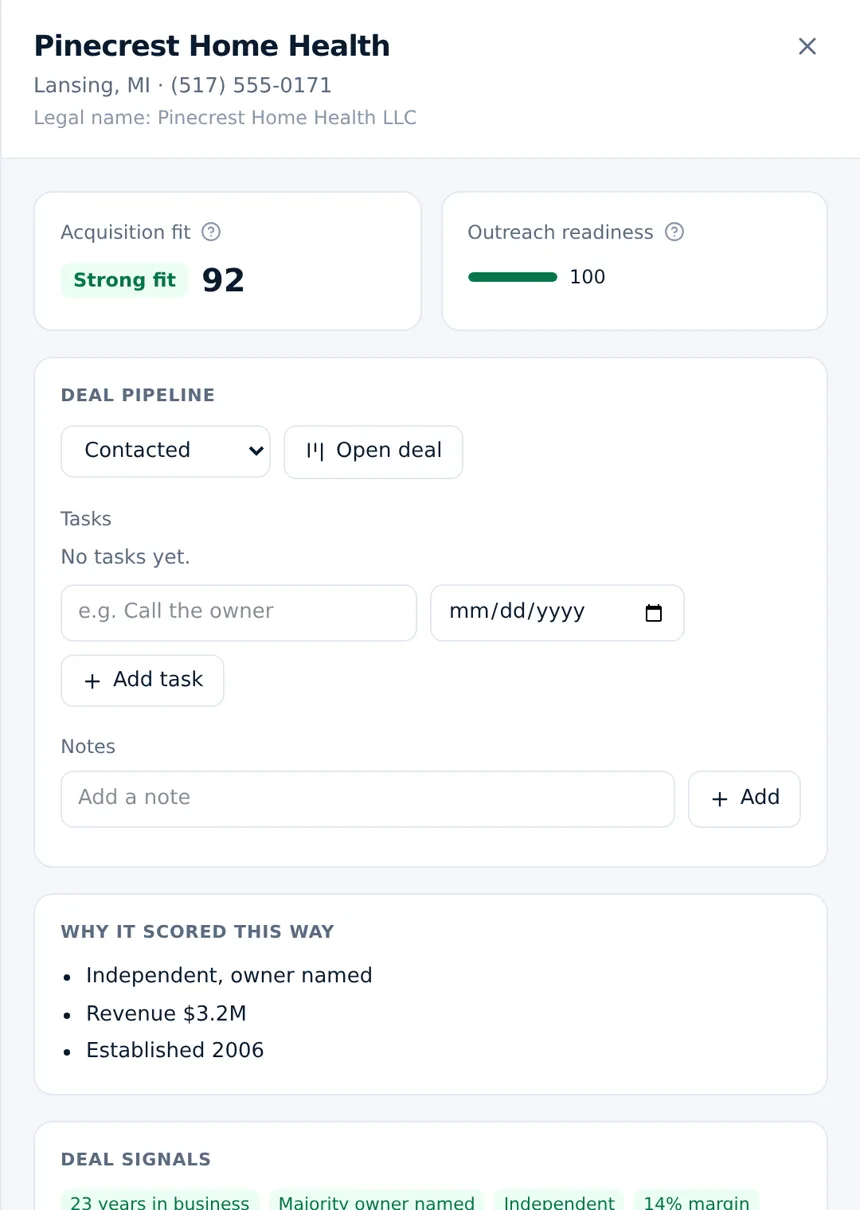
See the owner and the fit
Each business gets a fit score and an outreach readiness score, with the named owner, their stake, revenue and the reasons behind the score.
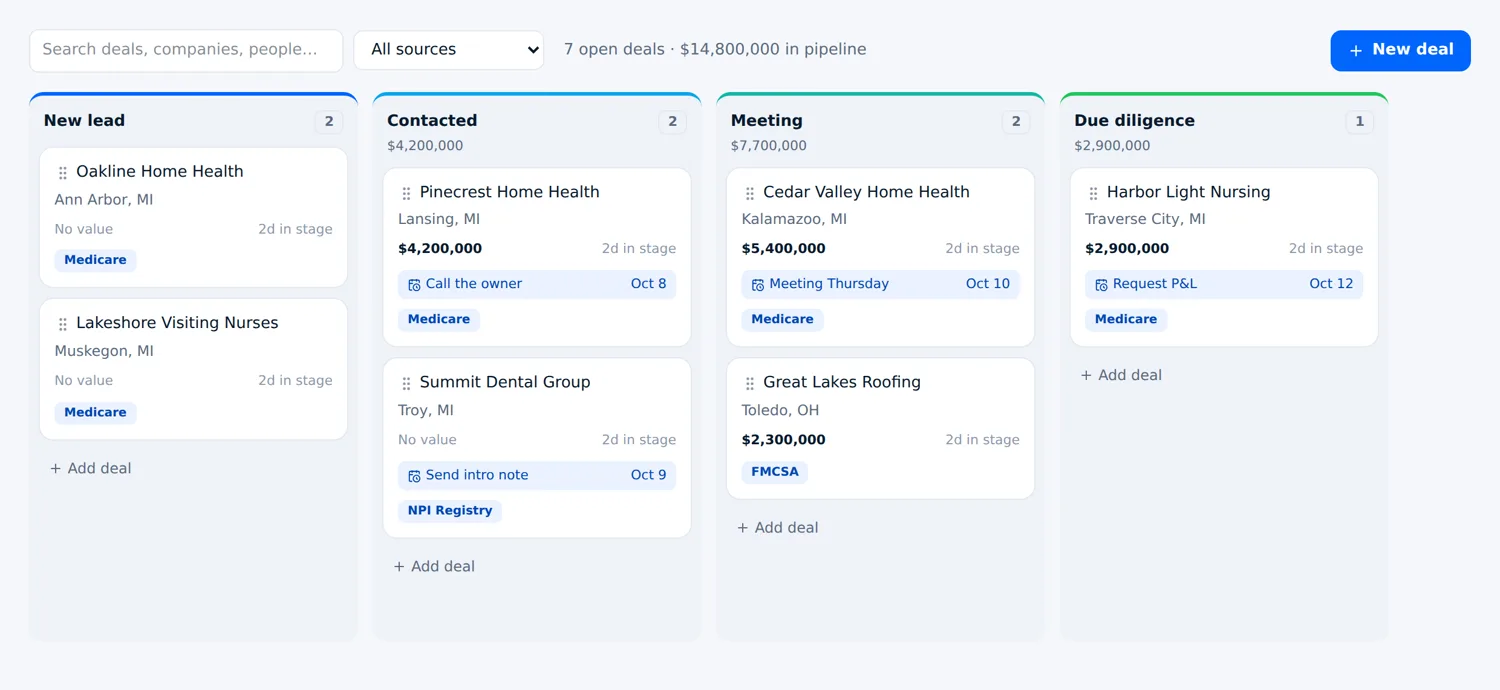
Work it as a deal
Add any business to your pipeline. Move it through your stages, set tasks and keep notes, with Medicare and registry deals together on one board.
Sample data. Businesses shown are fictional.
From a list of names to a signed deal.
Four steps in one workspace. You stay in control of every message.
Find the right people
Search by location, industry, title, company size, revenue, years in the seat and more, with include and exclude on every filter. Save the results to a list.
Warm them up
A profile visit, a like and a comment written for their post come first. The connection request follows, then a real conversation.
Approve and send
Every comment, note and message waits in Pulse until you press send. Replies stop the sequence and arrive sorted, with an answer drafted for you.
Work the deal
People who say yes land in your pipeline with the whole conversation attached. Stages, values, notes and tasks are already set up.
Warm them up before you ask.
Owners ignore cold pitches. A visit and a short note come first, then a thank you with real context once they accept, then two follow ups spaced like a person would. Start from this sequence or build your own.
- Write the exact words yourself, or let the AI personalize them
- Fields like {first_name} and {company} with safe fallbacks
- A/B test any step and keep the winner
- Pauses the moment someone replies
- 1Visit their profileDay 1
- 2Connection request with a short noteDay 2
- 3Thank you, with context and one questionOn accept
- 4Follow up2 days later
- 5Last touch, asking for 15 minutes3 days later
Everything in one place.
Search, outreach, inbox and pipeline, so nothing falls between tools.
Prospect search
More than 20 filters with include and exclude, from your own Sales Navigator account.
Seller signals
Rank owners by age, tenure and company size. Prefer older owners without dropping younger ones.
Their local time
Every touch lands inside the lead's own business hours, read from the location on their profile.
Pulse inbox
LinkedIn and email replies in one place, sorted into interested, not now and needs you.
Built in CRM
Your own stages, deal values, notes and tasks. Interested replies become deals on their own.
Profile visitors
See who looked at your profile each day and save them straight into a list.
A/B testing
Run two versions of any step and compare acceptance and reply rates side by side.
Team access
Invite teammates as members or admins to work the same leads, inbox and pipeline.
Stop stitching outreach together.
- Copying leads between tabs and spreadsheets
- Replies scattered across LinkedIn and email
- Messages that land at 6 AM in the wrong time zone
- Blunt automation that puts your account at risk
- Search, outreach, inbox and pipeline in one workspace
- Replies sorted for you, with an answer drafted
- Every touch inside the lead's own business hours
- Limits and approval that protect your profile
Careful with your accounts.
Your LinkedIn profile is your reputation. Every default is set to protect it.
Approval on every message
New campaigns start in approval mode. Nothing goes out until you press send.
A human pace
Daily limits per account, a weekly ceiling on connection requests, working hours only and random spacing between actions.
No passwords
You connect LinkedIn and email on a secure hosted page. We never see or store your passwords.
Your data stays yours
Each workspace is walled off from every other customer at the database level.
Simple monthly pricing.
Pick the volume you need. Change or cancel any time from the billing page.
- 2 LinkedIn accounts
- Prospect search with Sales Navigator
- LinkedIn and email sequences
- Pulse inbox with approval
- Built in CRM pipeline
- 3 LinkedIn accounts
- Everything in Lite
- Email support
- 15 LinkedIn accounts
- Everything in Starter
- Sending spread across accounts
- Priority support
- 30 LinkedIn accounts
- Everything in Explorer
- Priority support
- 60 LinkedIn accounts
- Everything in Scale
- Dedicated point of contact
- Prospect search with Sales Navigator
- LinkedIn and email sequences
- Pulse inbox with approval
- Built in CRM pipeline
- A/B testing on every step
- Team access
Prices in USD, billed monthly. LinkedIn Sales Navigator is a separate LinkedIn subscription and is needed for prospect search. Compare plans in detail.
Built for people who need to reach owners.
Acquirers and search funds
Reach every owner in a niche and a state, start confidential conversations about succession and run the deal from first reply to LOI.
B2B sales teams
Find decision makers by title, size and region, sequence them on LinkedIn and email and track every opportunity.
Agencies and consultants
Run outreach for your own firm or for clients, with everyone working the same inbox and pipeline.
“I built Deal Knock because I needed it. I was building an acquisition company and spent my days on LinkedIn finding owners, writing notes one at a time and losing track of who said what. Now I run my own outreach on it.”
Questions
Do I need LinkedIn Sales Navigator?
For prospect search, yes. Searches run through your own Sales Navigator account. You can also import a CSV or message people you are already connected with.
Will this get my LinkedIn account restricted?
Any automation carries some risk, so we keep it low: daily limits, a weekly ceiling of about 100 connection requests, sending only in working hours, random spacing and approval on every message by default.
Do you store my LinkedIn password?
No. You sign in on our provider's secure hosted page. We never see or store your LinkedIn or email password.
Can I write the messages myself?
Yes. Use your exact text with fields like {first_name} and {company}, or let the AI write from your playbook. You can edit any sequence at any time.
When do messages go out?
Inside both your sending hours and the lead's own business hours. Someone in Los Angeles hears from you at 9 AM their time, not 6 AM.
Is there a CRM?
Yes. A full pipeline with your own stages, deal values, notes and tasks. People who reply with interest are added for you.
Can I cancel any time?
Yes. Plans are monthly and you can change or cancel from the billing page whenever you like.
Start your first campaign this week.
Pick a plan, connect LinkedIn and have your first list of prospects within minutes.